
MusicTech.blog
FabFilter Pro-Q 4 Review: The EQ Plugin Every Mixer Should Know
January 15, 2026
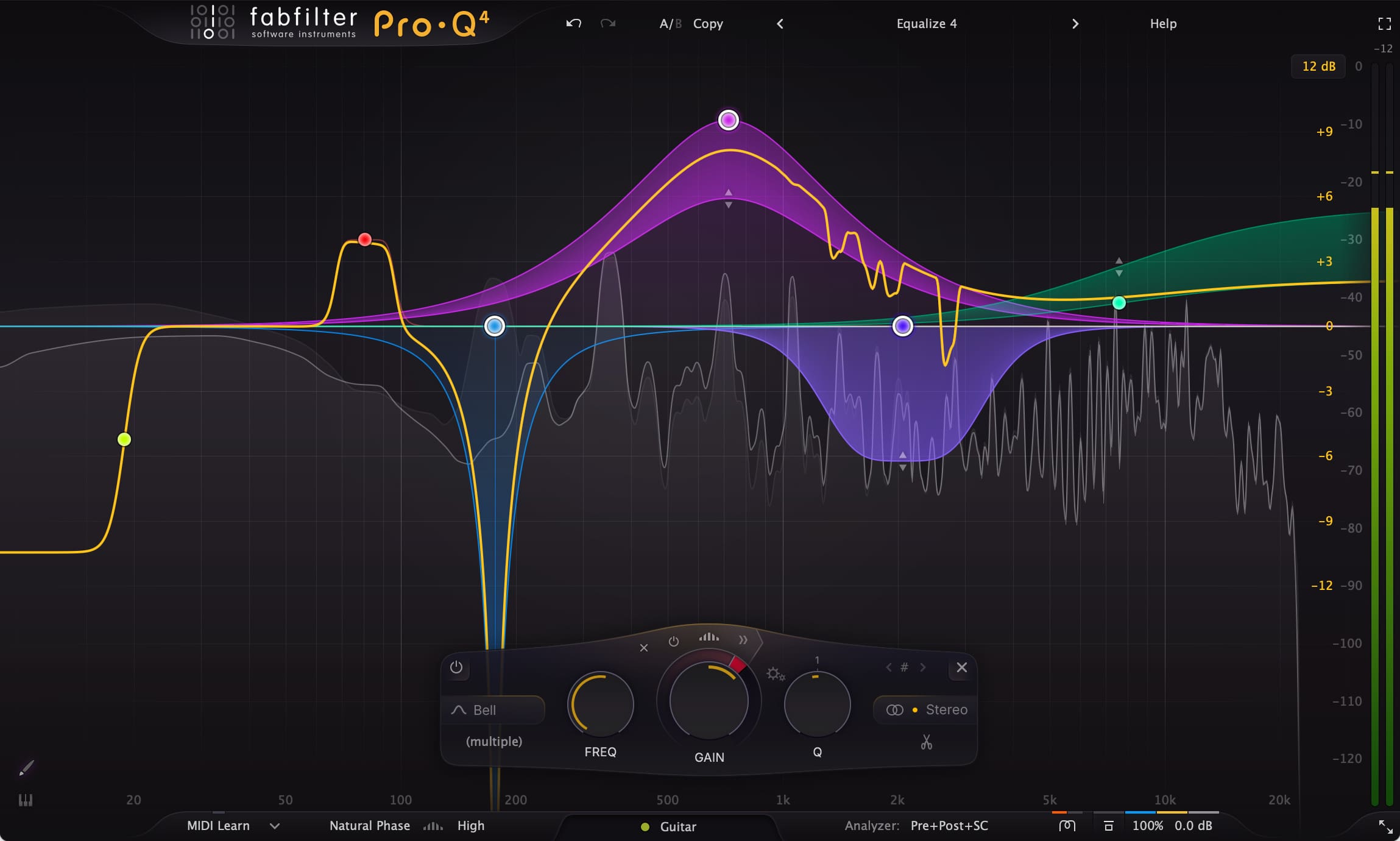
FabFilter Pro-Q has been the reference-standard parametric EQ plugin for over a decade — used by professional mixing and mastering engineers across every genre and found on nearly every serious mixing template in the industry. Version 4, released in December 2024, is the most significant update the plugin has ever received: not just additional features, but a fundamental expansion of what a parametric EQ can do. This review covers extended use across mixing and mastering sessions in Cubase.
What Pro-Q 4 Does
Pro-Q 4 is a fully parametric EQ plugin available in VST, VST3, AU, CLAP, and AAX formats — notably adding CLAP support over Pro-Q 3. Up to 24 bands with filter types including Bell, Notch, High/Low Shelf, High/Low Cut, Band Pass, Tilt Shelf, Flat Tilt, and the new All Pass filter. Slopes range from fractional values up to 96 dB/octave for surgical precision. The interface centres on a large frequency display showing the EQ curve alongside a real-time spectrum analyser. Bands are created by clicking anywhere on the display and adjusted by dragging, with numerical readouts and double-click precision entry throughout.
New in Version 4
Spectral Dynamics — Per-Band Dynamic EQ
The headline feature of Pro-Q 4 is per-band dynamic EQ. Every band can now behave as a dynamic processor, compressing or expanding its gain in response to the signal level at that frequency. Set a threshold, and the band only activates when the signal at that frequency exceeds it. This turns Pro-Q 4 from a static EQ into a precision dynamic processor without needing a separate plugin.
Practical applications are immediate. Harshness control on vocals: a high-Q band at the problem frequency with downward dynamic compression only cuts when harshness appears, preserving natural brightness the rest of the time. De-essing without a dedicated plugin: a dynamic band at 6–10 kHz with fast attack handles sibilance cleanly. Taming boxy resonances on acoustic guitar or piano that only occur on certain notes. Tightening low-end on bass where fundamental intensity varies across different notes. Each scenario previously required a separate dynamic EQ plugin or careful static EQ compromises — Pro-Q 4 handles them within the EQ already on every track. Attack and release controls are available per dynamic band, and the display shows gain reduction in real time as audio plays.
Curve Drawing Tool
A freehand curve drawing tool lets you paint arbitrary EQ shapes directly on the frequency display. Draw the curve you want and Pro-Q 4 automatically fits bands to match it. Most useful for matching the frequency response of one recording to another — draw the target curve from a reference spectrum analysis and let the plugin work out the band configuration. A practical tool for tonal matching and for producers developing their understanding of how EQ shapes relate to perceived sound.
Saturation Module
A saturation module adds adjustable harmonic distortion applicable before or after EQ processing. The character ranges from subtle harmonic enrichment to more obvious colouration, giving Pro-Q 4 analogue-style warmth that the pristine digital transparency of Pro-Q 3 entirely lacked. For adding a touch of life on the mix bus or mastering chain it’s well-implemented and genuinely useful — though dedicated saturation plugins remain preferable for heavier colour applications.
All-Pass Filters
All-pass filters affect phase rather than amplitude — shifting the phase of the signal at a set frequency without changing its frequency content. Applications include phase-aligning microphone signals at different distances, correcting phase anomalies from analogue hardware, and creative phase-based effects. A specific but legitimate addition for engineers working with multi-microphone recordings or hybrid signal chains.
The Core EQ Quality
The fundamental EQ engine is unchanged from Pro-Q 3 — which is to say, it’s excellent. Linear phase and minimum phase processing modes are available per band or globally, with zero-latency mode for tracking and natural phase mode for mastering. The Q implementation is musical across the full frequency range, the frequency resolution is high, and the transparency in minimum phase mode remains the reference standard the plugin has always been. The spectrum analyser — available in pre-EQ, post-EQ, or both simultaneously — is one of the most accurate and readable built into any EQ plugin.
Mid/Side Processing
Per-band M/S processing allows individual bands to affect only the Mid signal, only the Side signal, or both — making Pro-Q 4 an exceptionally capable mastering EQ. Bass roll-off applied only to the Sides tightens low end for mono compatibility. High-frequency air boosted only on the Sides adds openness without brightening the centre. Presence added to the Mid channel only improves vocal intelligibility without widening the stereo image. The M/S implementation is among the fastest-working of any M/S-capable EQ.
Real-World Workflow
In practice, Pro-Q 4’s dynamic EQ changes the mixing workflow in ways that compound across a session. The traditional approach to a harsh vocal is a static bell cut at the problem frequency — always active, even when the harshness isn’t present. With a dynamic band, the threshold means the cut only engages when harshness appears, and the vocal sounds more natural and open as a result. Multiply this logic across a mix — dynamic EQ handling sibilance on backing vocals, frequency competition between kick and bass managed with a dynamic cut on the bass fundamental, a dynamic high-shelf on acoustic guitar that only brightens during strummed sections — and the mix becomes more responsive in a way static EQ cannot achieve.
Pro-Q 4 for Mastering
On the mastering chain, Pro-Q 4’s combination of linear phase processing, M/S capability, dynamic EQ, and saturation makes it an unusually complete tool for a single plugin. A typical mastering pass might use it for: a gentle low-shelf boost in the Mid channel for warmth, a dynamic band at 3–5 kHz to tame harshness that only appears on certain sections, a Side-only high-shelf boost for air, and a touch of saturation to add harmonic density to a clean digital mix. Tasks that previously required two or three separate plugins are now handled in a single, low-latency instance.
Inter-Plugin Spectrum Comparison
Pro-Q 4 maintains the ability to display the spectrum of another Pro-Q instance as a ghost overlay — load Pro-Q 4 on a reference track and its spectrum appears in the instance on your competing instrument. A useful visual reference for frequency relationship management in dense mixes where two instruments compete for the same frequency space.
Compared to Alternatives
The most direct competitors are Waves F6 (capable dynamic EQ at a lower price, less refined interface), TDR Nova GE (excellent free and paid dynamic EQ, somewhat less polished), iZotope Neutron’s EQ module (well-integrated within Neutron’s broader mixing tools), and the Sonnox Oxford EQ (a classic with strong preamp emulation). Pro-Q 4 leads on interface quality, feature depth, and the combination of static and dynamic processing in a single transparent plugin.
Performance and CPU
Pro-Q 4 is CPU-efficient relative to its feature set. Multiple instances across a full mix, including instances with dynamic bands active, impose manageable load on modern hardware. Zero-latency mode (minimum phase, no additional plugin delay) is appropriate for tracking sessions at low buffer sizes where plugin latency headroom matters.
Pricing
Pro-Q 4 is available as a perpetual license — one purchase, no subscription. An upgrade path from Pro-Q 3 is available at a reduced price. A fully functional 30-day trial with no feature limitations is available from the FabFilter website. In a market moving heavily toward subscription models, the perpetual license and no-compromise trial are genuine differentiators.
Verdict
FabFilter Pro-Q 4 is the best parametric EQ plugin available. The dynamic EQ integration is flexible, musical, and well-implemented; the curve drawing and saturation are useful additions; the all-pass filter covers a specific but legitimate need; and the core EQ engine that defined the standard for a decade remains unchanged and excellent. For mixing and mastering engineers who use an EQ on every track, this is the tool to have. For producers ready to invest in a professional EQ, Pro-Q 4 is the first choice recommendation.