
MusicTech.blog
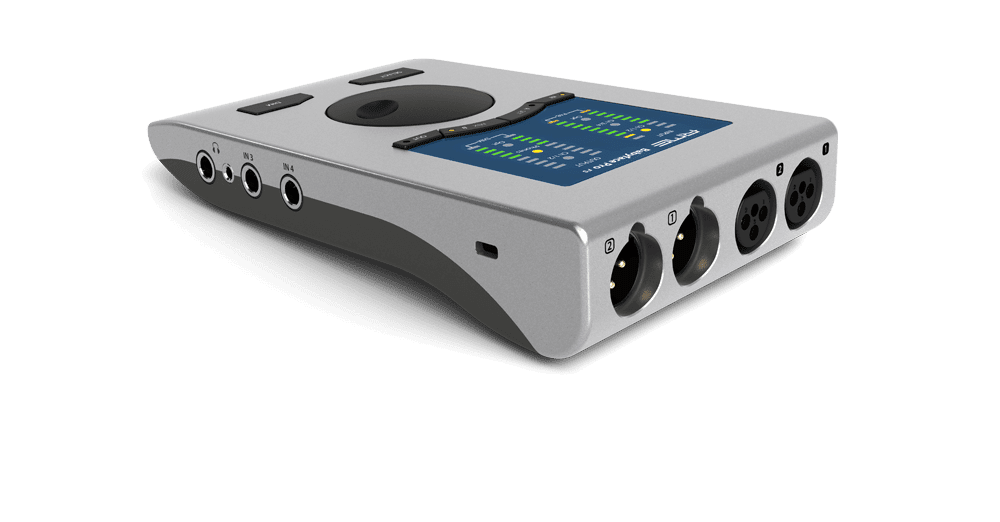
Your audio interface is the bridge between the analogue world — microphones, guitars, synthesizers, your voice — and the digital environment of your DAW. It handles the conversion in both directions: analogue to digital when you record, digital to analogue when you listen back. Get it right and it quietly does its job for years. Get it wrong and you’ll fight noise, latency, and compatibility problems every session.
This guide covers everything you need to know to make a good decision — what the specs actually mean, what to prioritise at different budget levels, and specific recommendations for different types of home studio producers.
What an Audio Interface Actually Does
An audio interface performs two core functions:
Analogue to digital conversion (ADC) — it takes the analogue electrical signal from a microphone or instrument and converts it into digital data that your DAW can record and process. Before that conversion happens, a microphone preamp amplifies the signal to a usable level (microphone signals are tiny — typically between -60dBu and -40dBu — and need to be boosted significantly before conversion).
Digital to analogue conversion (DAC) — it takes the digital audio output of your DAW and converts it back to an analogue signal for your studio monitors or headphones. The quality of this conversion affects what you hear when you play back your recordings and mixes.
Beyond the conversion itself, most interfaces also provide phantom power (the +48V required to operate condenser microphones), direct monitoring (hearing yourself through headphones without latency), and in many cases MIDI I/O for connecting hardware synthesizers and controllers.
Key Specs Explained
Sample Rate and Bit Depth
Nearly every interface sold today supports at least 24-bit / 96kHz, and most support 24-bit / 192kHz. For music production and recording, 24-bit / 44.1kHz or 48kHz is the appropriate working resolution — 44.1kHz for music intended for streaming and download, 48kHz for music intended for video or film.
Higher sample rates (96kHz, 192kHz) are not meaningfully better for most recording work and create larger file sizes and higher CPU loads. They’re useful for very specific applications — some producers prefer 96kHz for recording hardware instruments they intend to pitch-shift dramatically, or for capturing high-frequency content from acoustic instruments with unusual harmonic profiles. For general recording and production work, don’t let high sample rate support be a deciding factor.
Dynamic Range and Noise Floor
The dynamic range of an interface’s converters tells you how much distance there is between the noise floor (the quietest signal it can capture) and the point at which the signal clips (distorts). A higher dynamic range figure means more headroom and a cleaner recording. Modern interfaces at virtually every price point offer dynamic range figures above 100dB, which is more than sufficient for recording music.
The preamp’s Equivalent Input Noise (EIN) rating is more relevant to practical recording quality — it tells you how much self-noise the preamp adds to a signal. Lower EIN figures (more negative dBu numbers) are better. A figure of -128dBu or better is excellent; -120dBu is good; anything above -110dBu starts to be audible on quiet sources recorded in a quiet room.
Preamp Quality
The microphone preamp is the most sonically significant component in an audio interface. A good preamp amplifies the signal cleanly — adding as little of its own character as possible — while a poor one introduces noise, distortion, and a loss of the subtle detail that separates a professional-sounding recording from an amateur one.
At the entry level (under $200), the Focusrite Scarlett and Clarett lines, the SSL 2 and 2+, and the Audient EVO and iD series offer preamps that are genuinely good — clean, low-noise, and capable of professional results. The preamp differences between these and mid-range interfaces ($300–$600) are real but subtle. The jump from a genuinely bad preamp to a genuinely good one is dramatic; the jump between good and very good is much smaller.
Latency and Driver Performance
Latency is the delay between playing or singing something and hearing it back through your monitors or headphones. It’s determined by your buffer size setting in your DAW, the efficiency of your interface’s driver, and to a lesser extent your computer’s processing power.
On Windows, ASIO drivers (Audio Stream Input/Output) are the standard for low-latency audio. Every professional-grade interface includes its own ASIO driver. Avoid relying on ASIO4ALL — a generic ASIO wrapper for consumer audio hardware — as it performs poorly and introduces instability. A proper interface with a dedicated ASIO driver running at a buffer size of 128 samples will achieve round-trip latency below 10ms, which is undetectable in practice.
On macOS, Core Audio handles low-latency operation natively and all interfaces work with it without additional drivers.
How Many Inputs Do You Need?
This is the most practical question to answer before buying, because it immediately narrows the field.
- One input — you record one thing at a time: a vocal, a guitar, a single instrument. A two-channel interface like the Focusrite Scarlett Solo, SSL 2, or Audient EVO 4 covers this comfortably. Note that “two channels” usually means one mic preamp and one instrument input used separately, not simultaneously as two mics.
- Two inputs — you want to record two microphones at the same time (acoustic guitar with two mics, two vocalists, a mic plus a DI guitar simultaneously), or you work with stereo hardware. The Focusrite Scarlett 2i2, SSL 2+, or Audient EVO 8 are the right tier.
- Four inputs — you track small ensembles, use multiple mics on a drum kit, or run a hybrid studio with significant hardware. The Scarlett 4i4, Universal Audio Volt 476, or Audient iD14 mkII are worth considering.
- Eight or more inputs — you record bands, full drum kits with multiple mics, or need to capture many simultaneous sources. Look at the Focusrite Scarlett 18i20, PreSonus Studio 1824c, or Audient iD44 mkII.
Be honest about what you actually do now, and what you’ll realistically do in the next two to three years. It’s worth buying one step above your current needs rather than hitting a ceiling immediately.
Connection Type: USB, Thunderbolt, or PCIe
USB (USB-C and USB-A)
USB is the standard connection for the vast majority of home studio interfaces, and it’s perfectly adequate for most recording work. USB-C has become the norm on newer interfaces — it’s faster than USB-A and the cables are reversible, which is a minor but genuine quality-of-life improvement. Bus-powered USB-C interfaces (those that draw all their power from the USB connection rather than an external supply) are ideal for portable setups.
USB interfaces can handle high track counts and low latency without problems on a modern computer. Don’t let the USB connection deter you from an otherwise excellent interface.
Thunderbolt
Thunderbolt offers significantly higher bandwidth than USB and lower, more consistent latency — useful for interfaces with high channel counts (16+) or for producers who push very low buffer sizes for real-time software monitoring through complex plugin chains. The Focusrite Clarett+ range and Universal Audio Apollo interfaces use Thunderbolt.
For a typical home studio recording setup — under eight simultaneous inputs, standard buffer sizes — Thunderbolt’s advantages over USB are not practically meaningful. The price premium of Thunderbolt interfaces is significant, and unless you have a specific, demonstrable need for the extra bandwidth, a high-quality USB interface is the smarter buy.
Specific Recommendations by Use Case
Solo Vocalist or Podcaster
You record one microphone at a time, always. The Focusrite Scarlett Solo (4th Gen) is the default recommendation — clean preamp, excellent value, bulletproof reliability, and a software bundle that gets you started immediately. The SSL 2 is an alternative worth considering if you want a slightly different preamp character and the SSL 4K Legacy Mode processing. Either will serve you excellently for years.
Singer-Songwriter or Home Producer
You record vocals and acoustic or electric guitar, sometimes simultaneously, and work primarily with virtual instruments. The Focusrite Scarlett 2i2 (4th Gen) is the best-value option at this tier — two excellent preamps, USB-C bus-powered, solid direct monitoring, and widely supported across all DAWs. The Audient EVO 8 is a worthy alternative with four inputs if you anticipate needing more connectivity.
Electronic Music Producer with Hardware
You work with synthesizers, drum machines, and outboard hardware that needs to be recorded into your DAW alongside virtual instruments. The Focusrite Scarlett 4i4 or SSL 2+ gives you the line-level inputs needed for hardware gear, MIDI I/O for connecting hardware controllers and synths, and enough preamps to mic an amp or vocalist simultaneously. The Universal Audio Volt 476 is a step up in preamp quality with four inputs and a 76-style compressor on the front panel.
Serious Home Studio with Premium Preamp Needs
You’ve been recording for a while, you understand what you need, and preamp quality is a real priority. The Audient iD14 mkII offers two of Audient’s excellent console-derived preamps (the same lineage as their in-demand mixing consoles) at a strong price point. The Universal Audio Apollo Solo or Apollo Twin X adds UAD DSP processing — the ability to run UAD plugins in real time with near-zero latency — which is a genuine advantage if you want to track through high-quality emulated hardware.
What You Don’t Need to Worry About
A few things that get a disproportionate amount of attention in audio interface discussions that you can safely deprioritise:
- 192kHz sample rate support — you won’t use it for music production in any meaningful way, and it shouldn’t influence your buying decision
- Thunderbolt vs USB for home studio use — USB handles everything a typical home studio needs; Thunderbolt is for specific high-channel-count professional scenarios
- Bundled plugins — useful to get started, but not a reason to choose one interface over another; the interface hardware is what matters
- Brand loyalty — Focusrite, SSL, Audient, PreSonus, Universal Audio, and Arturia all make genuinely good interfaces at their respective price points. The preamp specs and I/O count are more important than the logo on the front panel
The Bottom Line
Choosing an audio interface comes down to three practical questions: how many inputs do you need simultaneously, what’s your budget, and do you need any specific connectivity (MIDI, optical, etc.) for your setup? Answer those honestly and the field narrows quickly.
For most home studio producers just getting started, the Focusrite Scarlett 2i2 remains the benchmark recommendation — not because it’s the only good option, but because it’s genuinely excellent at its price, widely supported, reliable, and provides enough connectivity to grow into for several years of serious recording work. From there, the next meaningful upgrade is to a four-input interface or to an interface with premium preamps like the Audient iD14 mkII — and that step can wait until you clearly need it.